So easy to use! Super responsive support and really makes signatures look professional and consistent!
Tired of chasing users to fix their email signatures?
Build templates, set rules, and manage signatures across Google Workspace and Microsoft 365—automatically.
14 days free trial. No credit card required!

IT teams love signaturky—here’s why
With signaturky I can easily set signatures for my employees in a few minutes!
Finally, an easy way to manage signatures across entire organization
Signatures at scale—designed, deployed, done.

Instantly access and update any user's signature
Instantly access and update any user’s signature across your domain, including aliases. No more asking users to do it themselves.
Accessing and updating user signatures is a Gmail-only feature.

Start with beautiful templates
or bring your own
Choose from professionally designed signature templates or import your own layout. All templates are ready for editing and brand customization.

Make signature match
your brand
Customize templates with your logo, colors, fonts, and structure—quickly and easily using the built-in Signature Creator.

Stay consistent.
No manual work needed.
Set it and forget it: signature rules are enforced continuously in the background.
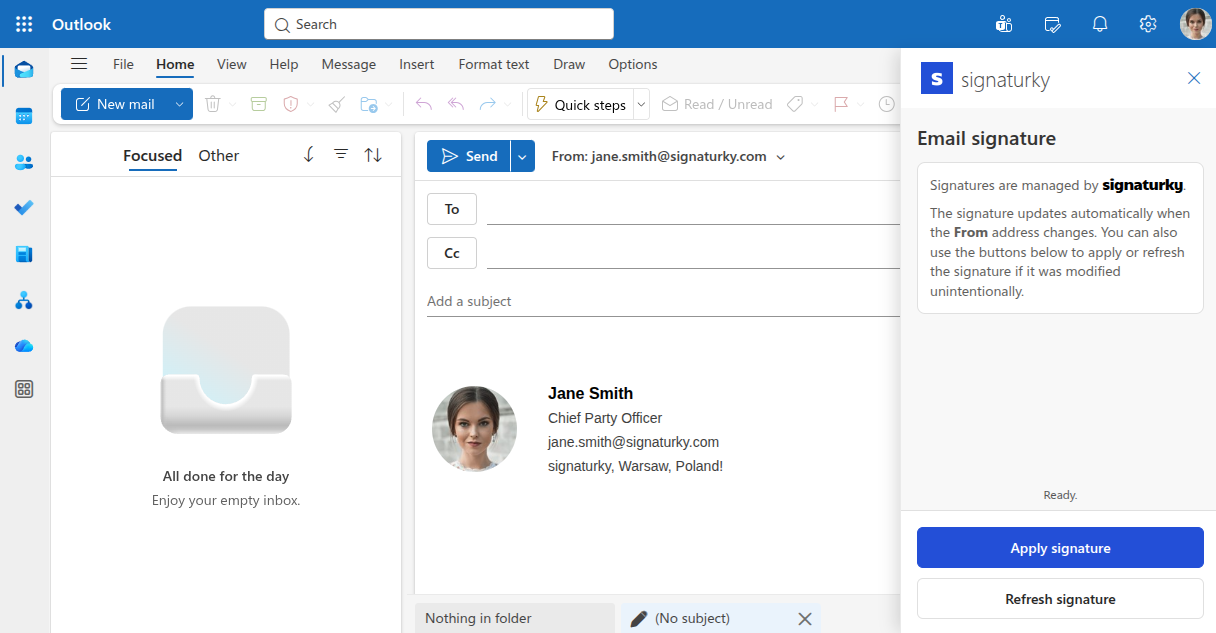
One add-in, everywhere
in Microsoft 365
Works seamlessly across Microsoft 365: Outlook Web App (OWA), Outlook desktop, and Outlook mobile apps—so your team gets the same signature experience on every device.
Pricing
Flat-rate pricing. No per-user surprises.
2 months free with a yearly plan!
1-150 users
€/$/
151-500 users
€/$/
501+ users
€/$/
Why signaturky pays off
- Save dozens of IT hours per year spent on manual signature updates.
- Ensure every employee email reflects your brand—automatically.
- Reduce internal chaos and support requests from users breaking signatures.
- Save compared to alternatives that charge per-user or require external consultants.
What you get with signaturky
Signature Templates & Branding
- Create unlimited signature templates to fit your needs.
- Enhance signatures with 40+ icons available in 90+ colors.
- Use your own signature design or choose from professional templates.
- Upload and host your images.
- Full support for custom user attributes.
Signature Management & Enforcement
- Ensure users signatures daily with automated enforcement.
- Set up custom rules for departments, groups, or users to enforce signatures effortlessly.
- Delegate signature management to non-admin users with ease.
Admin Dashboard & Support
- Easily track and manage signatures for every user.
- Email support included.
- Microsoft 365 (Outlook) and Google Workspace (Gmail) support.
Legal & Compliance
- No need to train users—everything is applied automatically.
- Ensure consistent structure for audit readiness.
- Enforce signatures daily with automated rules.
Frequently Asked Questions
What currency will I be charged in?
Payments are processed in USD for customers in the USA and Canada. For all other countries, payments are in EUR.
Can I install signaturky for a single user?
No, signaturky must be installed domain-wide for all users. However, only admins and authorized users will be able to manage and modify signatures.
Are discounts available for schools or nonprofits?
Yes! Contact us at contact@signaturky.com to receive special pricing for your domain. For educational institutions, pricing is based solely on faculty and staff—students, service accounts, and suspended users are excluded.
Where will my company data be stored?
We are an EU-based company, and your data is securely stored within the European Union.
What happens after the free trial?
You can pick a paid plan or uninstall—no credit card required during trial.
Is Microsoft 365 supported?
Yes. signaturky supports Microsoft 365 in Outlook desktop app, Outlook web app, and mobile apps. Install from Microsoft Marketplace.
Still have questions? Contact us.
Start your free trial—no strings attached
Install from Google Workspace Marketplace or Microsoft Marketplace and start your 14-day free trial.